In MT4, a template saves the setup of one chart, while a profile saves a full workspace with multiple open charts. Use templates when you want to apply the same indicators and chart style to another symbol. Use profiles when you want to switch between groups of charts, such as currencies, gold, crypto, or indices.
Templates and profiles in MetaTrader 4 help traders save and reuse chart setups. A template saves the settings of one chart, including chart type, colors, indicators, objects, and some Expert Advisor settings. A profile saves a group of open charts as a workspace, allowing traders to switch between different market layouts faster.
What are templates in MT4?
An MT4 template is a saved chart setup that can be applied to another chart. It usually includes the chart type, chart colors, scale, indicators, graphical objects, line studies, separators, and some attached Expert Advisor settings.
Templates are useful when you want several charts to look and behave the same way. For example, if you use candlesticks, a dark chart background, a moving average, RSI, and support/resistance lines, you can save that setup once and apply it to other charts instead of rebuilding it manually.
In MetaTrader 4, templates are managed from the chart menu. You can usually access them through Charts → Template, the chart context menu, or the chart toolbar.
What are profiles in MT4?
An MT4 profile is a saved workspace made of several open charts. When you open a profile, MT4 restores the charts and their settings as they were saved in that profile.
Profiles are useful when you monitor different groups of instruments or different trading styles. For example, one profile may contain major currency pairs, another may contain gold and oil charts, and another may contain crypto CFD charts. Instead of opening and arranging charts again each time, you can switch profiles.
In MetaTrader 4, profiles are usually managed through File → Profiles, the standard toolbar, or the profile area in the terminal status bar.
What is the difference between templates and profiles in MT4?
The main difference is scope: a template saves one chart setup, while a profile saves a full group of charts. Templates help standardise individual charts; profiles help organise entire workspaces.
Feature | MT4 Template | MT4 Profile |
Main purpose | Save one chart setup | Save a group of open charts |
Best for | Reusing indicators, colors, chart style, objects | Switching between workspaces |
Applies to | One chart at a time | Multiple charts at once |
Example use | Apply the same RSI and moving average setup to EUR/USD and XAU/USD | Switch from a currency-pair workspace to a gold/crypto workspace |
Menu location | Charts → Template or chart context menu | File → Profiles or profile toolbar/status area |
Affects open trades? | No, it changes chart appearance and tools | No, it changes workspace layout |
Good for beginners? | Yes | Yes, especially after several charts are used |
When should traders use MT4 templates?
Traders should use MT4 templates when they want to apply the same chart style, indicators, and analysis tools to different charts. This saves time and reduces setup inconsistencies.
A template is especially useful when you have a preferred chart structure. For example, you may want every chart to use:
- candlestick display
- the same chart colors
- one or two moving averages
- RSI or MACD
- visible period separators
- a clean zoom level
- selected support and resistance objects
Instead of recreating this setup for each new symbol, you can save it as a template and apply it whenever needed.
When should traders use MT4 profiles?
Traders should use MT4 profiles when they work with several charts and want to switch between different workspaces. A profile is not just a chart style; it is a complete layout of open chart windows.
For example, a trader using MT4 through a multi-asset broker such as NordFX may want separate workspaces for different market groups:
- one profile for currency pairs
- one profile for gold and silver
- one profile for crypto CFDs
- one profile for indices or stocks CFDs
- one profile for testing a strategy on a demo account
This keeps the terminal cleaner and makes market analysis more organised.
How do you save a template in MT4?
To save a template in MT4, first prepare the chart exactly as you want it, then use the template menu to save that chart setup.
Typical steps:
- Open the chart you want to customise.
- Set the chart type, timeframe, colors, zoom, and scale.
- Add indicators, objects, or line studies.
- Right-click the chart or open the Charts menu.
- Choose Template.
- Select Save Template.
- Give the template a clear name.
- Save it.
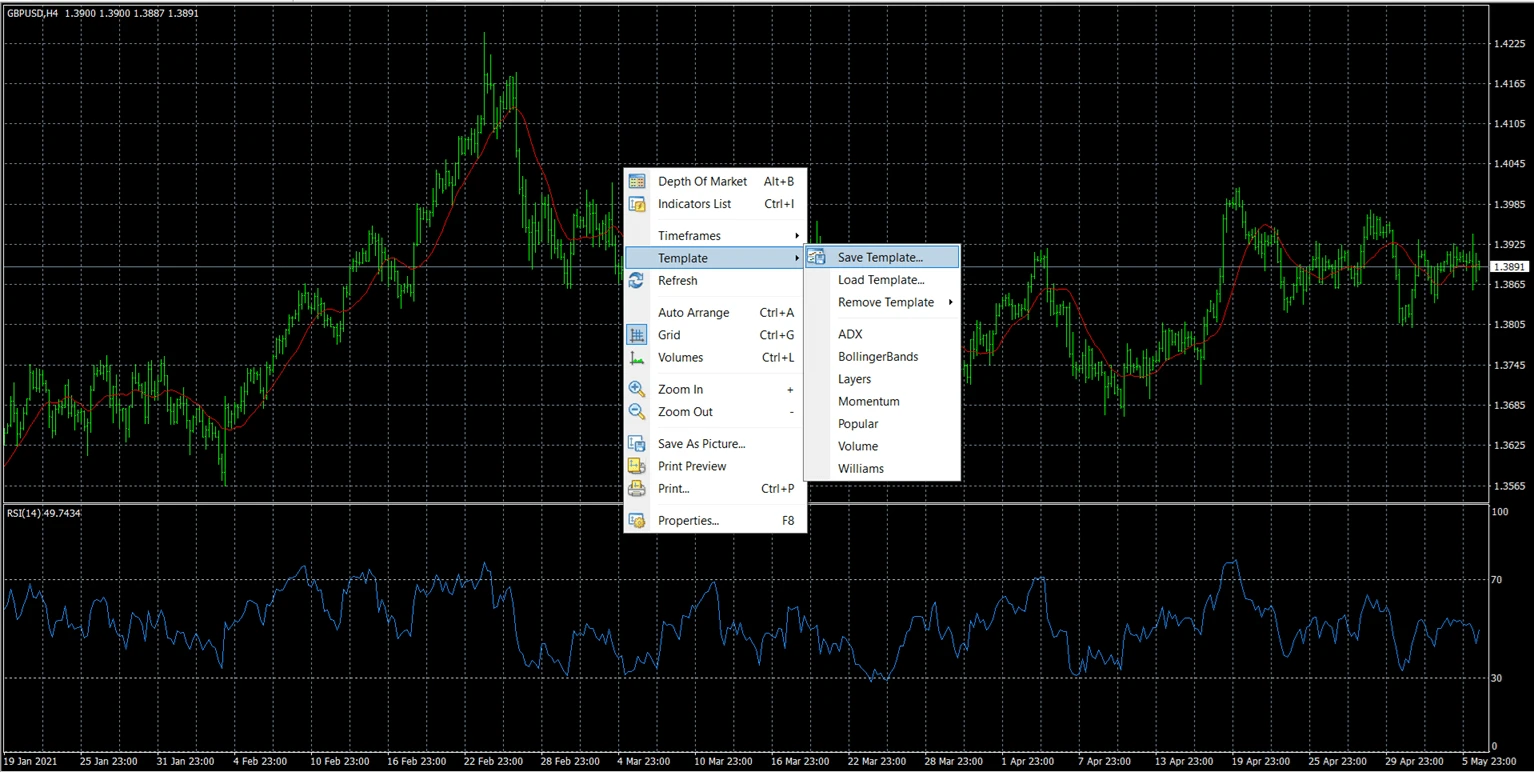
Good template names should be practical, not vague. For example:
- RSI_MA_Swing_Setup
- Clean_Candlestick_Chart
- Gold_Intraday_Template
- Crypto_Volatility_Setup
Avoid names such as “new template” or “test 1” because they become confusing later.
How do you apply a template to another MT4 chart?
To apply a template in MT4, open the target chart, go to the template menu, and select the saved template. MT4 will apply the saved chart setup to the active chart.
Typical steps:
- Open a new chart.
- Select the symbol and timeframe you want.
- Right-click the chart or go to Charts → Template.
- Choose the saved template from the list.
- Check that the indicators, chart style, and objects appear correctly.
Important: applying a template changes the chart setup, but it does not create a trading strategy by itself. A template can organise your tools, but trade decisions still require analysis, risk management, and clear rules.
How do you save a profile in MT4?
To save a profile in MT4, arrange all the charts you want in the workspace, then save the current chart group as a profile.
Typical steps:
- Open the charts you want to include.
- Arrange them by symbol, timeframe, and screen layout.
- Apply templates if needed.
- Go to File → Profiles.
- Choose Save As.
- Give the profile a clear name.
- Save it.
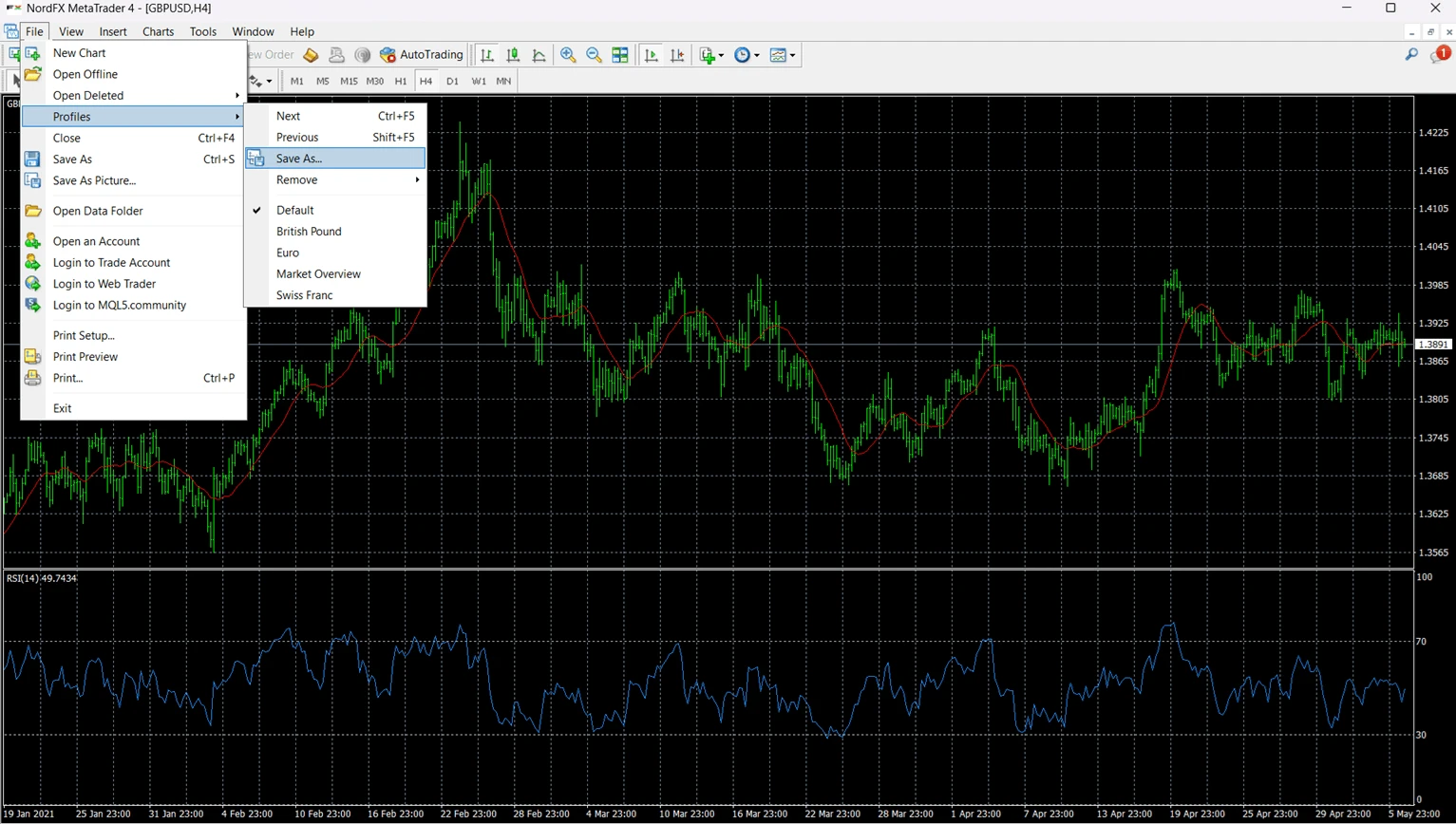
Useful profile names may include:
- Major_Pairs
- Gold_and_Silver
- Crypto_CFDs
- News_Trading_Watchlist
- Demo_Strategy_Test
A profile is most useful when it reflects how you actually analyse markets, not when it simply contains too many charts.
How do you switch between profiles in MT4?
To switch profiles in MT4, use File → Profiles, the profile button on the toolbar, or the profile area in the status bar. Select the profile name, and MT4 will load the saved chart workspace.
This is useful when you want to move quickly from one market group to another. For example, you may start the day with a currency-pair profile, then switch to a gold and crypto profile during periods of higher volatility.
Switching profiles does not open or close trades by itself. It changes the visible chart workspace.
Practical example: using templates and profiles in MT4
A trader wants to analyse several markets with the same technical setup: candlesticks, a 50-period moving average, a 200-period moving average, RSI, and a clean background.
First, the trader opens one chart in MT4 and builds the setup. After adjusting the chart style and adding the indicators, the trader saves it as a template called “MA_RSI_Setup.”
Next, the trader opens several charts, such as EUR/USD, XAU/USD, BTC/USD, and an index CFD, then applies the same template to each chart. This keeps the analysis layout consistent.
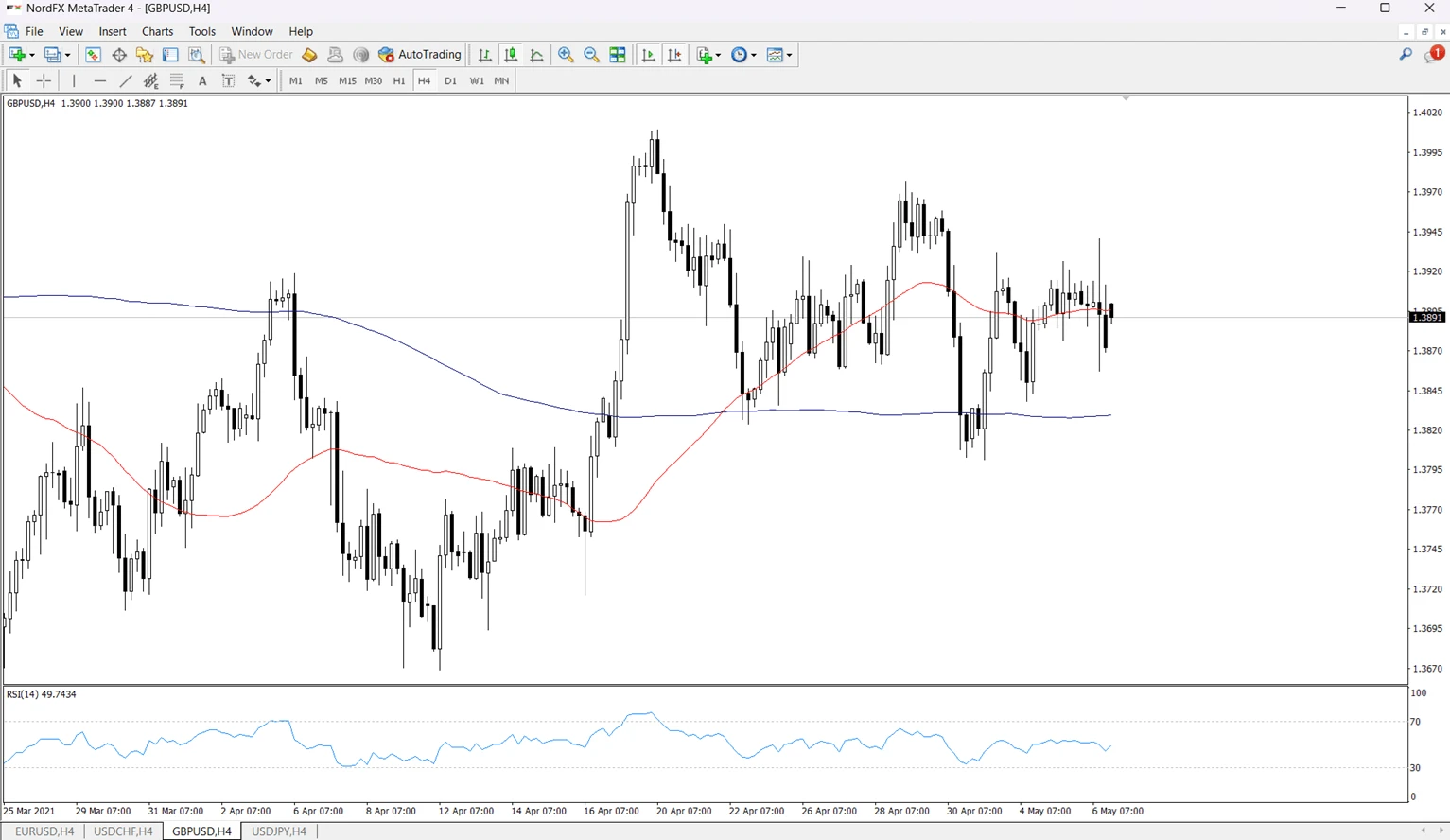
Finally, the trader arranges all charts on the screen and saves the workspace as a profile called “Multi_Asset_Watchlist.”
The template saves the single-chart setup. The profile saves the full multi-chart workspace.
How can templates and profiles help with risk management?
Templates and profiles do not manage risk automatically, but they can support more disciplined analysis. A clean, consistent chart layout reduces visual noise and helps traders follow the same process across different markets.
For example, a trader may create a template that includes key risk-management tools:
- visible bid/ask line if needed
- support and resistance levels
- volatility indicator
- moving average trend filter
- clean chart colors
- no unnecessary indicators
This does not replace stop-loss planning or position sizing, but it can make the chart environment more structured.
For broader trading education, NordFX also provides Useful Articles and a Trader’s Guide with additional educational materials.
Common mistakes when using MT4 templates and profiles
Mistake | Why it happens | How to avoid it |
Confusing templates with profiles | Both save settings, but they save different things | Use templates for one chart and profiles for multiple charts |
Saving too many unclear template names | Traders test setups and forget which one is final | Use descriptive names such as MA_RSI_Daily or Gold_Intraday |
Applying a template to the wrong chart | The active chart receives the template | Click the correct chart before applying the template |
Overloading templates with too many indicators | Traders try to save every tool in one layout | Keep templates simple and purpose-based |
Forgetting to save a profile after rearranging charts | MT4 may not restore the latest workspace as expected | Save the profile after major workspace changes |
Using profiles instead of a trading plan | A clean workspace can feel like a complete system | Treat profiles as organisation tools, not strategy rules |
Not testing templates on a demo account | Settings may not look practical across different symbols | Use a demo environment before relying on a setup |
Can templates and profiles be used with a NordFX MT4 account?
Yes. Traders who use MetaTrader 4 through NordFX can use MT4 templates and profiles as platform tools. NordFX is a multi-asset broker, while MT4 is the trading platform where chart layouts, templates, indicators, and profiles are managed.
If you are new to MT4, you may also find this guide useful: how to open an MT4 demo account. A demo account can help traders practise chart setup and workspace organisation before using a live account.
For traders comparing platform access, NordFX also provides information about trading platforms and MetaTrader 5.
How are MT4 templates and profiles related to chart analysis?
Templates and profiles are chart-organisation tools. They help traders keep analysis consistent, especially when switching between different symbols, timeframes, and market groups.
For example, a trader who studies trend-following setups may create one template for trend analysis and another for range-bound markets. The trader may then create separate profiles for different groups of instruments.
This makes MT4 easier to manage, especially when several charts are open at the same time. For more background on chart functions, see this NordFX article on MetaTrader charts.
FAQ
Are MT4 templates and profiles the same thing?
No. An MT4 template saves the setup of one chart, while an MT4 profile saves a full workspace with several charts. Templates are for chart style and tools; profiles are for chart groups.
Do MT4 templates save indicators?
Yes. MT4 templates can save indicators and their settings. This is one of the main reasons traders use templates: they can apply the same indicator setup to another chart quickly.
Do MT4 profiles save all open charts?
Profiles save the group of open charts and their layout. When you reopen a profile, MT4 restores the workspace as it was saved.
Do templates or profiles affect open trades?
No. Templates and profiles change chart layouts and workspaces. They do not open, close, or modify trades by themselves.
Can I use different templates inside one profile?
Yes. A profile can include several charts, and each chart can have its own template or individual settings. For example, one chart can use a trend template while another uses a volatility template.
Should beginners use MT4 templates?
Yes. Templates can help beginners keep charts clean and consistent. However, beginners should avoid adding too many indicators because a crowded chart can make analysis harder.
Should I practise templates and profiles on a demo account first?
Yes. Practising on a demo account is a safe way to learn how templates and profiles work without affecting live trading decisions. It also helps you build a cleaner chart routine.
Key takeaways
- MT4 templates save the setup of one chart.
- MT4 profiles save a full workspace with multiple charts.
- Templates are best for reusing indicators, colors, chart types, and objects.
- Profiles are best for switching between market groups or trading workflows.
- Templates and profiles improve organisation, but they do not replace a trading plan or risk management.
Editorial note
This article is intended for educational purposes and explains MetaTrader 4 platform functionality in a neutral way. NordFX is a multi-asset broker that provides access to MT4 and MT5 trading platforms; MT4 and MT5 are the trading platforms, not NordFX-owned terminals.
Meet the Author
Vanessa Polson is a marketing manager at NordFX with over twelve years of experience in online marketing within the financial services industry. She has developed and executed data-driven campaigns across search, social, and display channels in in-house environments. Her work focuses on translating complex financial products and trading tools into clear, practical educational content, giving her a broad and well-rounded view of the global trading landscape.
Connect with Vanessa on LinkedIn.
Go Back Go Back